How can we help?
Find quick answers about our apps and games or get in touch directly. A few precise details help us identify technical issues more quickly.
Open Family Time help →Find the help you need.
Search questions about our games and general answers. Detailed Family Time guides have their own help area.
69 answers
A dedicated guide for your family’s day.
Setup, calendars, tasks, meal plans and your wall-mounted iPad: Family Time Help brings together step-by-step guides, search and answers by topic.
CrateQuest
Help with gameplay, stars, collectibles, purchases and local progress.
Gameplay & controls
What is the goal of CrateQuest?
Push every crate onto a marked target. Crates can only be pushed, not pulled. The level is solved once every target is occupied.
How do I control the character?
Swipe directly on the game board or use the directional pad below it.
What can I do when I reach a dead end?
Undo steps back through your most recent moves. Restart begins the current level again. A previously saved best score remains intact.
Do I have to solve a world’s levels in order?
No. Within an unlocked world, you can select any of its 30 levels from the overview and replay solved levels whenever you like.
Are there hints or automatic solutions?
CrateQuest currently has no hint system. Use Undo, restart the level or switch to another freely selectable level for a while.
Stars, records & collectibles
How does the star rating work?
Every solved level awards one to three stars based on your number of moves. The more efficient your solution, the higher the rating. CrateQuest saves your best move count automatically.
Can I improve a rating later?
Yes. Replay the level and solve it in fewer moves. If the result is better, your move record and stars are updated.
What do collected stars unlock?
Each world offers up to 90 stars. At 15, 30, 60 and 90 stars, you unlock purely visual rewards: Target Pulse, World Glow, Explorer Aura and the World Master Set.
What are the treasuries?
Solving certain levels reveals finds that remain in that world’s treasury. CrateQuest contains 48 different regular collectibles in total.
How does the coin trail work?
Each world holds one rare Lydian gold coin. Solve more previously unsolved levels in that world to find it. Replaying already solved levels does not advance the coin trail.
Content, purchases & offline play
How many levels and worlds are included?
CrateQuest contains 210 levels across seven worlds with 30 levels each: Explorer’s Trail, The Blacksmith, Pony Farm, Druid Forest, Magic Castle, Underwater World and Outer Space.
What can I play for free?
The Explorer’s Trail contains 30 free levels. The six additional worlds can be unlocked individually or together through “All Worlds.”
Are world unlocks one-time purchases?
Yes. Worlds are non-consumable in-app purchases. There is no subscription.
Where can I see the current price?
The price for your country appears directly in CrateQuest before you confirm a purchase with Apple.
Are individual worlds credited toward “All Worlds”?
No. “All Worlds” is a separate in-app purchase. Worlds bought individually are not automatically credited against the bundle price.
How do I restore purchases?
Open the CrateQuest settings and tap “Restore Purchases.” The device must use the same Apple ID for Media & Purchases that made the original purchase.
My purchase is pending. What does that mean?
Apple has not completed the purchase yet. Check your internet connection and any approval that may still be required by Apple. You can then use “Restore Purchases.”
Can I play CrateQuest offline?
Yes. Available levels are playable offline after download. Downloading the app, loading prices, making in-app purchases and restoring purchases require an internet connection.
Does CrateQuest contain advertising?
No. CrateQuest contains no banner or video advertising.
Devices, progress & technical help
Which devices are supported?
CrateQuest is designed for iPhone and iPad running iOS or iPadOS 17 or later, in both portrait and landscape orientation.
Which languages does CrateQuest support?
English, German, Spanish, French, Italian, Dutch, Polish, Portuguese (Brazil), Turkish, Japanese, Korean and Simplified Chinese.
Can I turn off sound and vibration?
Yes. Sound effects and haptic feedback can be switched off separately in the settings.
Is CrateQuest available for Android?
CrateQuest is currently available only for iPhone and iPad.
Does my progress sync between devices?
No. CrateQuest stores progress, stars and collectibles locally and has no built-in cloud or Game Center sync. Purchase entitlements can be restored with the same Apple ID. Whether app data transfers through an Apple device backup depends on your system settings.
What happens if I delete the app?
Because progress is stored locally, deleting the app may remove it. Do not delete CrateQuest as your first troubleshooting step. Purchased worlds can be restored separately.
Do I need an account or Game Center?
No. CrateQuest requires no registration and does not use Game Center features.
Is my game data sent for advertising or analytics?
No. CrateQuest contains no advertising and no third-party analytics or tracking services. Progress and settings are stored locally. See the privacy policy for details.
What should I try first when something goes wrong?
Close CrateQuest completely and open it again. Also check that you use the current app version and an up-to-date iOS or iPadOS version. The CrateQuest version appears at the bottom of the settings.
How do I report a bug or broken level?
Email support@masomas.app with your device, system version, CrateQuest version, world and level number, expected and actual behavior, plus steps that reproduce the issue. A screenshot or screen recording helps. Never send passwords, full Apple ID credentials or payment details.
Hammer Toss
Answers about controls, scoring, the Precision Course, throws, purchases, duels and technical help.
Gameplay & scoring
How do I aim a hammer throw?
Touch the hammer and pull it down and, if needed, sideways. The opposite direction of your pull determines its flight path; the farther you pull, the farther the hammer flies. Release to throw. Small adjustments help you dial in each new target.
How does a round work?
A round contains five targets and exactly one throw per target. In Solo mode, target types are reshuffled and each throw becomes more demanding. After the fifth throw, the results show every target’s points, your total score and your bullseyes.
How is the score calculated?
Your distance from the center awards 0, 25, 50, 75 or 100 base points. Farther and smaller targets have a higher difficulty multiplier, so a displayed throw score can exceed 100 points. Your five throw scores add up to the round result.
What is the golden target?
The golden target is a rare bonus target that may appear at the end of a course. It doubles the target value, so an accurate final throw can still change the round dramatically.
What is the Precision Course?
The Precision Course is a free training mode with five fixed exercises. It uses no throws and changes neither your solo statistics nor your Game Center high score. You can experiment with direction and pull strength without pressure.
What does aim assist do in the Precision Course?
With aim assist on, you see the flight direction and predicted landing point. Turn it off to hide those guides and apply a ×1.25 multiplier to every scored training throw. Training points still do not affect your regular statistics.
How do the hammers differ?
The Standard Hammer has a balanced flight arc. The Storm Hammer needs a longer pull, flies flatter and rotates more slowly. Pinky needs less pull, flies higher and rotates faster. No hammer has a direct score bonus; your hit still decides the points. Pinky is an optional permanent unlock.
Throws, refills & purchases
When do free throws refill?
You start with 15 free throws. When the last one is used, a 30-minute timer starts. All 15 free throws then refill together. The timer keeps running while Hammer Toss is closed.
Why is the refill timer running while I still have throws?
Free and additional throws are managed separately. The timer starts as soon as your free throws are gone; you can keep using throws bought or earned as a high-score bonus while it runs. After 30 minutes, the 15 free throws are added again.
Do I get a reward for a new high score?
Yes. If you beat your previous high score after five throws in Solo mode, you receive 15 bonus throws unless you already have unlimited throws. Results from the Precision Course and duels do not trigger this reward.
Do I have to buy additional throws?
No. You can always wait for the complete free refill or train in the Precision Course. Throw packs are only an optional way to keep playing without waiting.
What is the Hammer Pass?
The Hammer Pass permanently unlocks unlimited throws. It is a one-time in-app purchase, not a subscription. Pinky’s optional unlock is separate. Hammer Toss shows the price for your country before confirmation.
How do I restore purchases?
Open the Hammer Toss settings and choose “Restore Purchases.” Permanent unlocks such as Pinky and the Hammer Pass can be restored with the same Apple ID. Apple cannot restore consumable throw packs.
Duels & Game Center
How does a duel work?
Both players complete the same course of five throws. Duels run asynchronously through Apple Game Center, so you do not need to be online at the same time. The five duel throws are deducted from your inventory just like Solo throws.
How do I find an opponent?
Open “Duel” and start a new challenge. You can find an opponent automatically or invite a shared Game Center friend. Open invitations and active matches then appear in your duel overview.
How is a tie decided?
Total score is compared first. If it is equal, the player with more bullseyes wins; average accuracy is the next tiebreaker. If those values are also identical, the duel ends in a tie.
Why is Game Center not working?
Check the iOS or iPadOS settings to confirm that you are signed in to Game Center, and verify your internet connection. Restart Hammer Toss afterward. If only friends are missing, also check friend access in Game Center. If the problem remains, send us your device, system version and app version.
Why has my high score not appeared on the leaderboard yet?
Your Solo high score is saved locally right away. You must be signed in and online for the Game Center leaderboard, and its update can take a short moment. If a score could not be sent, Hammer Toss retries the submission later.
Devices, settings & data
Can I play Hammer Toss offline?
Yes. Solo mode and the Precision Course work without an internet connection after download. Duels, Game Center leaderboards, in-app purchases and restoring purchases require a connection.
Which statistics are stored and synced between devices?
Hammer Toss stores your high score, rounds played, bullseyes, hit rates, streaks and recent round history locally on your device. These detailed statistics do not sync automatically between devices. When used, Game Center receives only the intended leaderboard and multiplayer data.
What happens if I interrupt a round?
The current course and throws that have already been scored are stored locally, so you can continue the round the next time you open it. A throw is deducted from your inventory only after its impact has been scored.
Can I turn off sound and vibration?
Yes. Open the Hammer Toss settings. Sound effects and haptic feedback can be switched on or off independently.
Does Hammer Toss contain advertising or tracking?
No. Hammer Toss contains no banner or video advertising and uses no third-party analytics or tracking services. Game Center is optional and provided by Apple. See the privacy policy for details.
Which devices and languages are supported?
Hammer Toss is designed for iPhone and iPad running iOS or iPadOS 17 or later. iPhone uses portrait orientation; iPad supports portrait and landscape. The app is available in English and German.
Puzzli Kids
Answers about piece counts, picture assistance, the Parents’ Area, personal photos and privacy.
Difficulty & picture assistance
Can I make the puzzles more detailed or difficult?
Yes. In addition to 4, 9, 16 and 25 pieces, you can enable 36, 49 and 64 pieces in the protected Parents’ Area. Tap the gear at the top right of the home screen, open the Parents’ Area and choose “Choose piece counts” under “Puzzles and photos.” Enable every size that should be offered to your child before a puzzle starts.
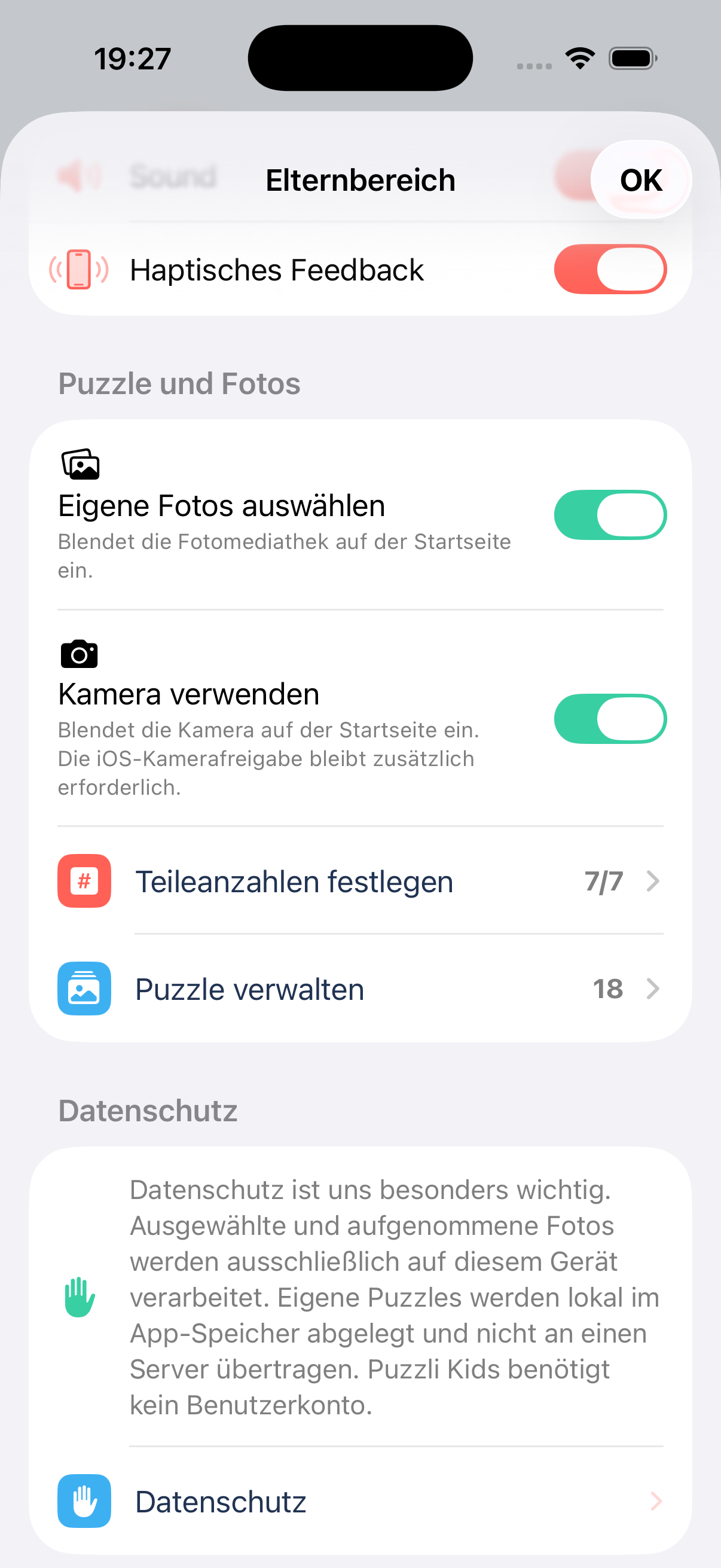
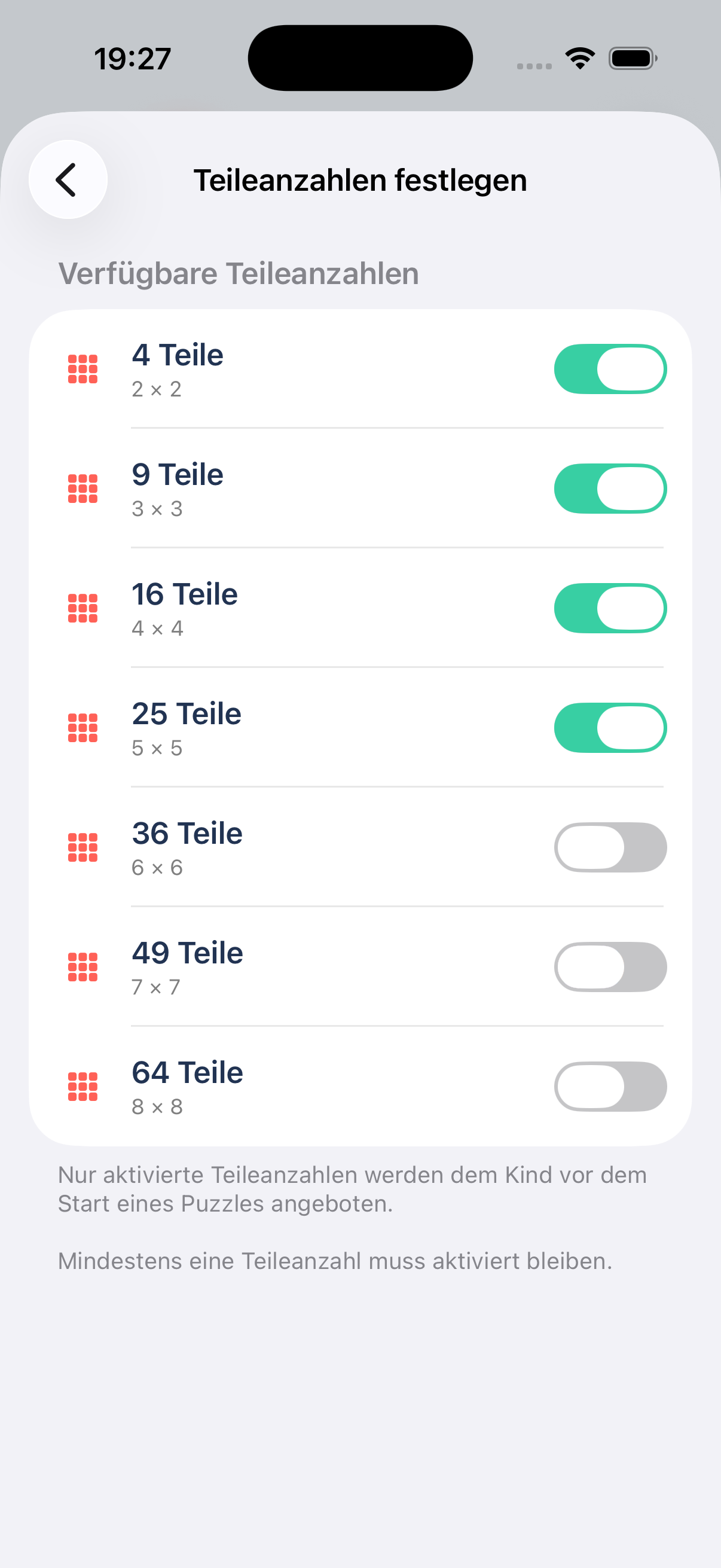
Only enabled piece counts appear for the child, and at least one size must remain enabled. The screenshots show the German interface; labels change with the app language.
Does my child always have to see every piece count?
No. You choose which of the seven sizes—4, 9, 16, 25, 36, 49 and 64—are offered. This keeps the selection simple and lets you add more challenging sizes as your child gains experience.
What does the picture guide do?
Before starting a puzzle, enable “Show picture guide.” The complete picture then appears faintly beneath the empty shapes to make matching easier. Leave the guide off for a greater challenge.
Parents’ Area & content
How do I open the Parents’ Area?
Tap the gear at the top right of the home screen and solve the short arithmetic problem. This check helps prevent children from changing settings accidentally. The area locks again when the app moves into the background.
Can I hide photo selection and the camera from my child?
Yes. Under “Puzzles and photos” in the Parents’ Area, turn off “Allow photo selection” or “Allow camera use.” The corresponding button then disappears from the home screen. iOS camera permission is still required for taking photos.
How can I hide puzzles or delete personal pictures?
Open “Manage puzzles” in the Parents’ Area. You can hide personal and ready-made puzzles so they are not offered to children. Personal pictures can also be permanently deleted from the device; hidden pictures remain stored and can be shown again later.
Can I turn off sound and vibration?
Yes. Sound and haptic feedback can be switched on or off separately under “General settings” in the Parents’ Area.
Photos, privacy & technical help
Which pictures can I use?
Choose a picture through the iOS photo picker, take a new photo or use one of the included ready-made scenes.
Why can’t I see photo selection or the camera?
First check that “Allow photo selection” or “Allow camera use” is enabled in the Parents’ Area. If the camera still does not open, check the camera permission for Puzzli Kids in the iOS or iPadOS settings. Taking a photo is unavailable on devices without a camera.
Where are personal pictures stored?
Selected and captured pictures are processed only on this device and stored locally inside the app. They are not uploaded to a server. You can permanently delete personal pictures through “Manage puzzles.”
Can I use Puzzli Kids offline?
Yes. Ready-made pictures, personal photos and puzzling work without an internet connection. Only external pages such as support, privacy and the legal notice require a connection.
Does Puzzli Kids require an account or use advertising and tracking?
No. Puzzli Kids requires no account, contains no advertising and uses no analytics or tracking services. See the privacy policy for details.
General questions
Contact, refunds and privacy.
How do I report a bug?
Email support@masomas.app. Include the game, device, iOS or iPadOS version, app version, expected and actual behavior, and steps that reproduce the issue. Screenshots or screen recordings help.
How are refunds handled?
Apple handles payments and refunds directly. Use Apple’s Report a Problem page.
Is personal data collected?
No registration is required. Our games contain no advertising and use no third-party analytics or tracking services. Read the privacy policy for details.
Which information should I never send by email?
Never send passwords, full Apple ID credentials, credit-card details or other payment information. Apple handles billing and refunds.
Write to us — we’re happy to help.
Contact us by email for questions about our apps and games or technical issues. Apple handles questions about charges, refunds and your Apple ID directly.